- It is so true that most companies would collapse if computers were removed, however schools would not notice much of a difference. This does show that teachers are not using technology as much or in the ways they should. Personally, I know at my school very few teachers use any technology for instruction. I am one of the few and I have found that students are more interested when the lesson is high tech.
- The whole concept of talking word processors is new to me but sounds like something more teachers should be using. Even at the high school level I think this could be helpful to students who are on IEPs.
- The visual literacy section introduced a lot of new terminolgy but was not as helpful in how to apply such factors to the assignments. I guess what I took from it was how to make things more visually attractive and eye-catching. It was helpful in showing how to make things stand out by using colors, textures, lines, or other elements.
In order to make my newsletter I read through the various tutorials. Some of the information I had known from typing papers in the past. However, some things were new to me. One thing I learned was about the Tab function. In the past I have used the tab key mainly to indent paragraphs. I had no idea you could change the tab settings to get different tab alignments. I was amazed when I found out you could even have different tabs on one line. When I type worksheets for my students I put the assignment title, name, period, etc. spaced across the top of the page. In the past I have always had to press spacebar to position each where I wanted it to go. I definitely see using this tab function instead and it will make it much faster and neater.
It was fun to use Word to make a newsletter because this was something I have not really done before. I decided to make the first page of my syllabus for this assignment because I think it will be more eye catching to the students and they will be more likely to read through the rules and remember things from the paper. However I made the newsletter in color and our school can only print black and white, so I may need to play around with it a little. But I figure I can at least print out one version in color, enlarge it, and hang it in the room as a visual reminder for students.
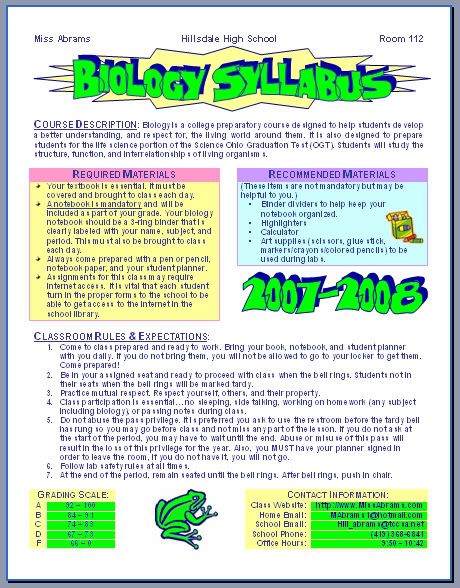
This assignment got me to thinking of how I can use this in other ways in my classroom. I already have a class website for students and parents to use. But I also thought I could make a classroom newsletter and send it out via email rather than wasting paper. That way it is more likely that the parents will actually see it (students tend to throw papers out instead of take them home to show parents) and I can make it in color without having to worry about printing costs.


1 comment:
Melissa,
There are so many neat things that can be done to motivate your learners (and parents). Great idea posting your newsletter to your blog site! Can I share your address with the rest of the class? I know they will benefit from your advance uses of technology.
Deanna
Post a Comment